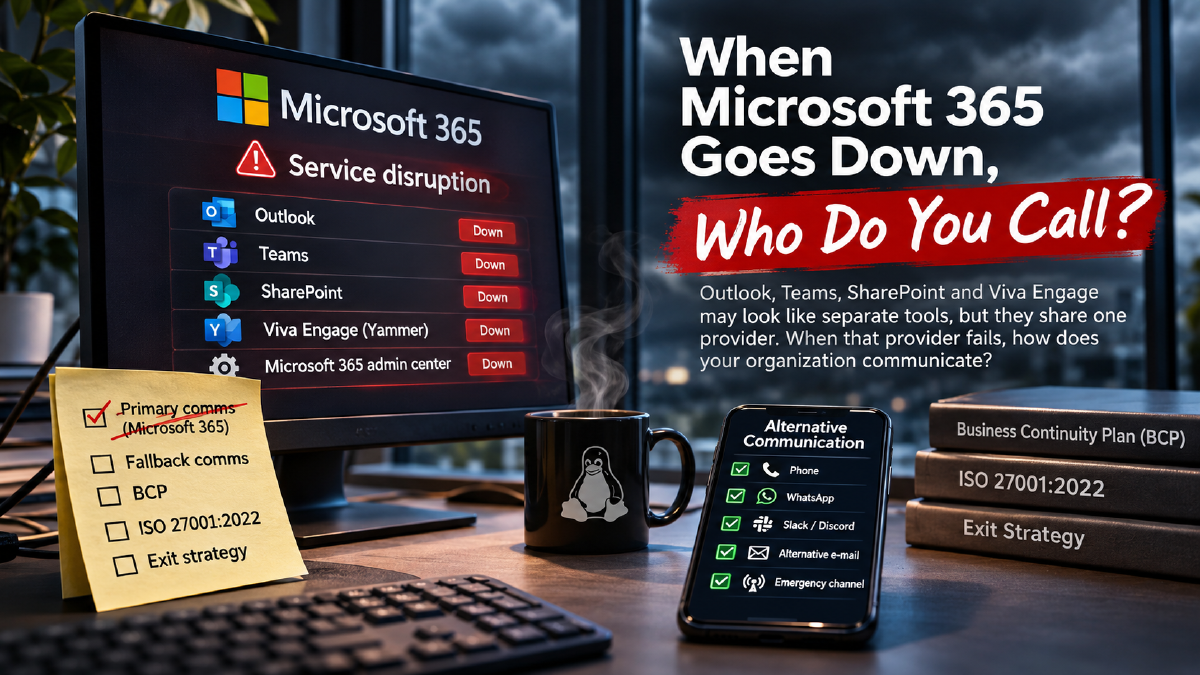

Outlook is down. Teams is down. SharePoint is unavailable. Your management portal isn’t responding. So how exactly are you supposed to coordinate the incident?
On November 12, 2026, Microsoft 365 experienced a significant service disruption, affecting users who depend on Microsoft’s cloud ecosystem for their daily work. Outlook, Exchange Online and other Microsoft 365 services were reported as affected, while users also described problems accessing collaboration tools and administrative interfaces. For many organizations, this wasn’t simply an inconvenience. Their primary communication and collaboration infrastructure suddenly became unreliable or unavailable.
As the incident unfolded, I came across several LinkedIn discussions about what was happening. Daren Klum connected the outage to broader concerns about cybersecurity, artificial intelligence and the growing dependence on centralized infrastructure. Tom Tran approached it from a more practical perspective, pointing out that even the Microsoft 365 admin center was reportedly experiencing problems while administrators were being directed there for incident updates.
I checked admin.microsoft.com myself during the disruption, and it wasn’t responding for me either.
Now, I don’t want to turn this into another article speculating about whether Microsoft was attacked. At the time, there was no confirmed evidence connecting the disruption to an AI-driven attack or the separately reported Outlook vulnerability. An infrastructure failure doesn’t automatically become a cybersecurity incident simply because it happens at an inconvenient moment.
What interests me far more is something that organizations should have been discussing long before this outage.
What happens when all your communication tools belong to the same provider, and that provider becomes unavailable?
Five Communication Tools, One Dependency#
Think about how the average corporate organization communicates today. Outlook handles email, Teams handles meetings and instant messaging, SharePoint stores documents and internal information, and Viva Engage, formerly known as Yammer, provides internal communities and organization-wide conversations. Add OneDrive, Microsoft 365 Groups and the various administrative portals, and you have an extensive ecosystem supporting almost every aspect of daily business communication.
On paper, these are different products serving different purposes. Employees may see them as separate communication channels, and management may assume that having multiple tools provides sufficient flexibility.
But they all belong to Microsoft.
That doesn’t mean every Microsoft service runs on exactly the same infrastructure or that every outage will affect every product simultaneously. Microsoft’s services have different architectures, redundancy mechanisms and operational dependencies. Nevertheless, they exist within the same commercial and technical ecosystem, and some share critical infrastructure, identity services, administrative components and operational dependencies.
When an incident affects those shared dependencies, several seemingly independent communication channels can become unavailable together.
If Outlook stops working, perhaps you can contact colleagues through Teams. But what if Teams is affected too? Perhaps you can publish an announcement on Viva Engage. But what if that service is also unavailable, or employees cannot authenticate? Maybe the incident procedures are stored in SharePoint, which is experiencing problems as well.
And if the Microsoft 365 admin center is unreachable, even the administrators responsible for coordinating the response may struggle to access their normal management and information channels.
Suddenly, the organization discovers that it doesn’t really have five independent communication systems.
It has five applications depending, to varying degrees, on one provider.
This is the distinction between having multiple tools and having genuine operational redundancy. Different application names do not automatically mean independent failure domains.
We Warned About Putting Everything in One Basket#
I’ve experienced this kind of consolidation firsthand. Before a corporate transition, the organization I worked within had several communication platforms across different business units. Some teams used Slack, others used Discord, and additional communication channels existed alongside the more traditional enterprise services.
Was that environment perfectly standardized? Certainly not. Different platforms introduced administrative complexity, inconsistent policies and additional security considerations. I understand why corporate IT departments prefer a unified environment, particularly when licensing, compliance, identity management and support need to be managed across a large organization.
But there was also an advantage that shouldn’t be overlooked. Not every communication channel depended on the same provider.
When the organization became part of a larger corporate structure, communication and collaboration were consolidated into the corporate Microsoft ecosystem. We raised concerns about concentrating too many critical dependencies with a single supplier. Our argument wasn’t that Microsoft was a bad choice or that Slack and Discord were automatically better alternatives. It was that removing independent communication paths could increase the impact of a provider-wide disruption.
Nevertheless, corporate standardization prevailed.
Today, the remaining alternative communication arrangements are largely based on WhatsApp groups at team level. Those groups can be useful when colleagues need to reach each other, but they are not automatically a substitute for an organization-wide emergency communication platform. They may not include everyone who needs to be informed, they may lack formal escalation procedures, and their use for sensitive operational information requires appropriate governance.
More importantly, they were not necessarily designed as part of a tested business continuity architecture.
And that’s where my concern lies.
Organizations spend considerable amounts of money designing redundant servers, storage platforms, network connections and datacenter infrastructure. We discuss high availability, geographical redundancy, automated failover and disaster recovery as though they are fundamental engineering principles.
Yet when it comes to communication, we sometimes consolidate everything into a single vendor ecosystem and assume the provider’s internal redundancy is enough.
High availability within one provider is not the same as resilience against the failure of that provider.
Standardization can make an environment easier to manage. It doesn’t automatically make the organization more resilient.
Your Business Continuity Plan Needs a Communication Plan#
Let’s imagine a major incident affecting an organization that depends heavily on Microsoft 365. Email is unavailable, Teams meetings cannot be established, employees cannot access the usual collaboration environment and internal documentation may be difficult to retrieve.
How does the incident response team communicate?
Who contacts senior management? How are employees informed? How do technical teams coordinate recovery activities? How do customers receive updates? And how does the organization ensure that important decisions are documented when its normal communication and document management platforms are unavailable?
These questions belong in a Business Continuity Plan, not in a panicked discussion after the outage has already started.
An effective BCP should identify which business processes are critical, how long those processes can tolerate disruption and what alternative arrangements are required to continue operating. Communication is a fundamental dependency for almost every recovery procedure, because even the best technical recovery plan becomes difficult to execute when the people responsible cannot coordinate their actions.
An independent communication channel doesn’t necessarily need to be complicated. Depending on the organization, it could involve a separately hosted messaging platform, an alternative email environment, a dedicated emergency notification service, telephone trees or another properly managed solution.
The important requirement is independence.
If your fallback communication system depends on the same Microsoft identity provider, the same conditional access policies or the same unavailable infrastructure, you may have created another dependency rather than a genuine alternative.
And having an alternative isn’t enough. People need to know it exists, have access to it before an incident and understand when and how it should be used. Emergency contacts must be maintained, procedures must be available outside the affected environment and the arrangements must be tested.
A backup communication platform that nobody has logged into for three years isn’t much use when the primary platform fails.
The same applies to documentation. If the only copy of your disaster recovery procedures is stored in SharePoint, and SharePoint becomes unavailable, your documentation strategy may have failed at exactly the moment it matters most.
A Business Continuity Plan you cannot access during a disruption is not an operational recovery capability. It’s just a document.
ISO 27001:2022 Is More Than a Certificate on the Wall#
For organizations operating under ISO 27001:2022, this discussion has a direct connection to information security governance. The standard doesn’t prohibit using a single cloud provider, and it doesn’t require every organization to operate multiple communication platforms. What it does require is a systematic approach to information security risk assessment, risk treatment and the selection of appropriate controls.
Several controls from Annex A are particularly relevant. Control 5.23 addresses information security for the use of cloud services, including acquisition, use, management and exit considerations. Controls 5.29 and 5.30 concern information security during disruption and ICT readiness for business continuity. Controls 5.19, 5.20 and 5.21 address supplier relationships, supplier agreements and ICT supply chain security.
The relevant question isn’t whether an organization uses Microsoft 365. It’s whether the risks associated with depending on Microsoft 365 have been identified, assessed and appropriately treated.
Has the organization evaluated what happens when its primary communication provider becomes unavailable? Has it determined the consequences for critical business processes? Are alternative communication methods documented and tested? Are the remaining risks understood and accepted by the appropriate management level?
And perhaps most importantly, can the organization demonstrate that its continuity arrangements actually work?
A risk register containing an entry for cloud service unavailability is a useful starting point, but recording a risk isn’t the same as treating it. Likewise, an approved policy doesn’t guarantee that employees can communicate during a real incident.
ISO 27001 certification is not a promise that outages cannot happen, nor does a single incident automatically establish nonconformity. But an organization that has identified a critical dependency and relies on continuity controls should be able to demonstrate that those controls are suitable and effective.
If the practical fallback for an entire corporate communication environment consists of a collection of informal WhatsApp groups, I would want to understand how that arrangement was evaluated against the organization’s continuity requirements.
That’s not a criticism of WhatsApp. It’s a question about risk management.
Compliance should support operational resilience, not become a substitute for it.
An Exit Strategy Is Not the Same as a Backup#
There’s another subject that frequently receives less attention than it deserves: the cloud exit strategy.
Migrating an organization into Microsoft 365 is usually treated as a major transformation project. There are migration plans, technical assessments, budgets, consultants, project managers and detailed discussions about how users and data will be moved into the platform.
But how much effort is invested in determining how the organization could leave?
What happens if contractual conditions change, costs become unacceptable, regulatory requirements evolve or the organization decides that its dependency on a single provider is no longer appropriate? Can email, documents, identities and collaboration workflows be migrated without unacceptable disruption? Are the technical and organizational dependencies sufficiently understood to make an exit realistic?
An exit strategy isn’t a mechanism for solving a temporary Microsoft outage. You don’t migrate an entire organization to another platform because Exchange Online is unavailable for a few hours. That is what business continuity arrangements are for.
But a temporary outage can reveal dependencies that are equally relevant to a future exit.
If employees cannot authenticate without Entra ID, if applications rely on Microsoft-specific integrations, if communication workflows are built entirely around Teams and if documentation is tightly coupled to SharePoint, leaving the ecosystem becomes considerably more complicated than exporting a collection of files.
Backups are important, but data portability is only one part of an exit strategy. Replacing the services, workflows, integrations and operational capabilities surrounding that data is often the more difficult challenge.
A mature organization should understand both scenarios: how to continue operating during a temporary disruption and how to transition away from a provider when that becomes necessary.
Neither question should be left unanswered simply because the current provider is large, familiar or commercially successful.
Do It Right. Do It Yourself.#
Anyone who knows me knows that I’m a strong advocate of self-hosting. I’ve never been particularly enthusiastic about handing over control of every service simply because a large technology company offers a convenient subscription. I prefer understanding the infrastructure I’m responsible for, knowing where my data resides and being able to investigate problems without waiting for someone else’s status page to change.
My philosophy has always been simple: Do it right. Do it yourself.
That doesn’t mean self-hosting is automatically better. Running your own infrastructure requires knowledge, time, maintenance, monitoring, security updates, backups and tested recovery procedures. A poorly maintained self-hosted service can be far less secure or reliable than a professionally managed cloud platform.
For me, it’s about having a choice. I don’t need to compete with Microsoft, Google or any other technology giant. Nor do I pretend that my infrastructure can match their scale, resources or engineering capabilities.
I simply prefer to remain in control of the services I choose to operate myself, including the responsibility when something goes wrong.
Self-hosting isn’t about proving that I can do something better than a hyperscaler. It’s about understanding my dependencies and deciding which ones I’m willing to accept.
Independence doesn’t mean eliminating every dependency. It means knowing which dependencies you’ve chosen.
My Mail Server Doesn’t Care If Microsoft Goes Down#
Perhaps the simplest example is my own email infrastructure.
My personal domain, roethof.net, runs its own mail service. When Microsoft 365 experiences an outage, my mail infrastructure doesn’t suddenly stop working. The same applies when Google Workspace experiences problems. My email service is not dependent on either provider being operational.
Of course, that doesn’t mean every email can always be delivered immediately. If a recipient’s mail provider is unavailable, delivery may be delayed. SMTP was designed to handle temporary failures through queuing and retries, although actual delivery behavior depends on the configuration and availability of the participating mail systems.
But my own mail environment can remain operational.
Microsoft 365 down? Google Workspace down?
Don’t care. My mail server keeps running.
Not because I don’t care about the people affected, but because I deliberately chose an architecture in which the availability of those providers doesn’t determine whether my own mail service is available.
And yes, my infrastructure can go down too. Hardware can fail, networking can break, software updates can introduce problems and even carefully maintained systems occasionally behave in unexpected ways. I’m not claiming otherwise, and I certainly don’t pretend to operate infrastructure with the same scale or resources as Microsoft or Google.
But there’s another difference.
I’m not a global technology company making billions from enterprise subscriptions and selling services on the basis of reliability, availability and operational convenience. I operate my own infrastructure because I enjoy the technology, value my independence and accept the responsibility that comes with it.
That doesn’t mean a hyperscaler should never experience an outage. Distributed systems operating at that scale are extraordinarily complicated, and even the most experienced engineering teams cannot eliminate every possible failure.
But commercial scale and complexity don’t eliminate accountability.
Organizations paying for critical enterprise services should expect professional incident management, transparent communication, well-designed resilience mechanisms and realistic recovery arrangements. At the same time, those organizations remain responsible for understanding the consequences of depending on those services.
My infrastructure can fail. Absolutely. But I’m not making billions promising organizations that my platform will support their daily business operations.
And if my own infrastructure fails, at least I know who is responsible for fixing it.
Me.
Stop Treating Alternative Communication as an Afterthought#
If there’s one lesson I want organizations to take from this Microsoft 365 outage, it isn’t that Microsoft is unreliable or that everyone should immediately migrate away from the public cloud. It isn’t that an AI-driven cyberattack must be responsible, and it certainly isn’t that buying another security product will magically eliminate the problem.
It’s that communication is too important to depend entirely on one provider without a credible fallback.
Outlook, Teams, SharePoint, Viva Engage and the Microsoft 365 administrative ecosystem may offer excellent functionality, but they should not be mistaken for independent communication infrastructure simply because they have different names and icons.
If the provider becomes unavailable, organizations need a way to communicate that doesn’t rely on the affected ecosystem.
That means having alternative channels for incident response teams, emergency contact procedures for employees, independently accessible recovery documentation and a tested method of communicating with management, customers and other critical stakeholders. It also means ensuring that the alternative doesn’t depend on the same identity or infrastructure components that may have caused the primary failure.
And those arrangements need to exist before the outage.
You cannot expect employees to register for an unfamiliar messaging platform, locate missing telephone numbers or reconstruct escalation procedures while the organization’s normal communication systems are already unavailable.
This is where architecture, governance and operational discipline meet. ISO 27001 provides a framework for identifying and managing the risks. Business continuity planning establishes how critical processes should continue. Technical architecture determines whether the necessary alternatives can function independently. Testing demonstrates whether the assumptions are actually correct.
None of these elements can be replaced by a vendor’s availability promise.
A 99.9% SLA doesn’t provide an independent communication channel. A service credit doesn’t restore a missed customer interaction. And a disaster recovery document stored exclusively inside an unavailable cloud environment doesn’t help the engineer trying to coordinate recovery.
I’m a self-hosting enthusiast, and I make no secret of that. I prefer control, independence and infrastructure I can manage myself. But this isn’t an argument that every organization should become its own cloud provider.
It’s an argument for making deliberate choices about dependency.
Use Microsoft 365 if it meets your requirements. Use Google Workspace if that’s the better fit. Self-host your communication infrastructure if you have the capabilities and a sound reason to do so. Combine different approaches where that provides meaningful independence.
But whatever you choose, make sure your organization can still communicate when the primary provider is unavailable.
Because when Outlook is down, Teams is down, Viva Engage is unavailable and your admin portal won’t load, the worst possible moment to discover that you have no alternative communication strategy is right then.
Five communication applications from one provider are not five independent communication channels.
And a Business Continuity Plan without a working alternative communication method is missing one of its most important components.
When Microsoft 365 goes down, who do you call?
Make sure you know the answer before the next outage.
References#
- Daren Klum — LinkedIn discussion
- Tom Tran — LinkedIn profile
- Microsoft 365 Service Health
- ISO/IEC 27001:2022 — Information security management systems
Ronny Roethof